🔆 Lumen: Real-Time Global Illumination and Reflections
The overview named Lumen as the second pillar, the one that removes the lighting bake. This lesson is where that promise gets its detail. Lumen is Unreal's system for real-time global illumination and reflections, and its whole purpose is to give you the bounced, indirect light and the reflections a scene needs without precomputing anything, so you can move the sun and watch the world relight instantly. You will see what global illumination actually is and why a scene lit only by direct light looks wrong, why lighting used to be baked into textures and what that cost, and how Lumen computes the bounce every frame instead. Then the practical half: reflections from the same system, the instant relight loop that changes how you work, and the choice between software and hardware ray tracing along with what Lumen costs.
🏔️ Advanced Track · Environment Art
This is the third lesson of the Environment Art with Nanite, Lumen & PCG track. The first lesson mapped the whole modern pipeline, and the second went deep on geometry with Nanite. Here we go deep on the second pillar, light. Where Nanite lets a world be built from detailed geometry, Lumen lets that world be lit without baking, so the light bounces, the reflections update, and the sun can move in real time. The next lesson takes PCG and procedural placement, then a capstone assembles a complete environment.
🎯 Learning Objectives
By the end of this lesson, you will be able to:
- Explain what global illumination is and why a scene lit only by direct light looks wrong
- Describe why real-time global illumination used to be too costly, so lighting was baked into lightmaps, and what that bake cost
- Explain how Lumen computes bounced light every frame with no bake, so lights and the sun can move
- Describe how Lumen reflections come from the same system and integrate with the bounced light
- Explain the relight loop and why instant lighting feedback changes how a lighting artist works
- Choose between software and hardware ray tracing and name Lumen's main costs and limits
Estimated Time: 45-60 minutes
Prerequisites: The track overview, The Modern Environment Pipeline, and the geometry lesson, Nanite: Virtualized Geometry. Helpful but not required: the beginner lessons on lighting fundamentals and Lumen global illumination, which introduce direct and indirect light. A working Unreal Engine 5.8 install with Lumen available.
In This Lesson
Light That Bounces: What Global Illumination Is
Start with what light actually does in the real world. When sunlight hits a surface, only some of it is absorbed; the rest bounces off and travels on, carrying a tint of whatever it hit. A wall in shadow is never truly black, because light that struck the sunlit floor nearby bounced up and filled it, picking up the floor's color on the way. This bounced, secondhand light is called indirect light, and the job of accounting for it, all the light that reaches a surface after bouncing one or more times, is global illumination, usually shortened to GI.
Direct light is the easy half: it travels straight from a source, the sun or a lamp, to a surface, and any surface facing away from the source gets none of it. If you compute only direct light, every shadowed face and every corner the sun cannot reach goes flat and black, and the scene looks harsh and unreal, like an object lit by a single bare bulb in a room painted matte black. Global illumination is what fills those areas back in. It is the soft warmth in a shadow, the color one surface casts onto another, the general sense that a space is lit and not just spotlit. Get it right and a scene reads as a real place; leave it out and no amount of detailed geometry will save the look.
Figure: What global illumination adds · with only direct light the shadow side of an object goes black. Global illumination is the bounced, indirect light that fills those areas, and it carries the color of whatever it bounced off, here the warm tint of sunlit sand.
Why Light Used to Be Baked
Global illumination is expensive to compute, because tracing where light goes after it bounces, again and again, off every surface, is a lot of work to do sixty or more times a second. For most of real-time graphics history that was simply out of reach, so the classic solution was to compute it ahead of time and store the answer. This is called baking. A tool, in Unreal historically the Lightmass system, would precompute all the bounced light in a level and write the result into textures called lightmaps that wrap each surface. At runtime the engine did not compute any bounce at all; it just read the baked lightmap, which was cheap. The look could be gorgeous, because the bake could afford to be thorough.
The cost was in the workflow. A bake is slow, minutes for a small scene and hours for a large one, and you paid it every time the lighting changed. Worse, because the answer was frozen into textures, the lights had to hold still: you could not move the sun for a time-of-day change, because its bounce was baked for one position only. Every surface needed a second set of unwrapped texture coordinates just for its lightmap, and the lightmaps ate memory and disk. Moving objects could not receive the baked bounce properly and needed separate approximations. None of this was a flaw in the idea; it was the price of precomputing. But it meant lighting a world was a slow, commit-and-wait loop, and a dynamic sun was off the table.
💡 The bake loop, and its tax
flowchart TD
    A[Author the lighting
place lights, set the sun] --> B[Build Lighting
Lightmass precomputes every bounce]
    B --> C[Wait for the bake
minutes to hours]
    C --> D[Bounced light is frozen
into lightmap textures]
    D --> E{Change a light
or move the sun?}
    E -->|yes, rebake| B
    E -->|no| F[Ship it,
but the lighting is static]
    style A fill:#faf0e6,stroke:#c1662f
    style B fill:#f3ece4,stroke:#a9772f
    style C fill:#f3ece4,stroke:#a9772f
    style D fill:#fdf1e7,stroke:#c1662f
    style E fill:#ede7f6,stroke:#7e57c2
    style F fill:#e8f5e9,stroke:#4CAF50
Baking moved the cost of the bounce out of the frame and into a build step. That made runtime cheap, but every lighting change meant another wait, and the sun could not move.
Lumen: Global Illumination Without the Bake
Lumen takes the opposite bet: compute the bounce at runtime, every frame, fast enough to keep up. It can do this because it does not trace light against the full, millions-of-triangles scene directly. Instead Lumen keeps a lightweight stand-in for the world, a coarse representation built from mesh distance fields plus a cached record of each surface's color and how lit it is. Tracing rays against that simplified scene is far cheaper than tracing the real geometry, cheap enough to afford in real time.
Each frame, for the points the camera can see, Lumen gathers indirect light by sending out rays that sample this representation: a ray leaves a surface, travels until it meets something in the stand-in scene, and brings back the light and color it found there. Do that across the view and you have an estimate of the bounced light arriving everywhere, updated live. Because nothing is precomputed, there are no lightmaps, no lightmap coordinates, and no bake to wait for, and crucially the lights can move. Slide the sun and the whole world's bounce follows it, because the bounce is being recomputed continuously rather than read from a frozen texture. This is the pillar the overview promised: light without baking.
Figure: Lumen gathers the bounce at runtime · instead of baking, Lumen keeps a coarse stand-in of the scene made of distance fields and a cached record of surface lighting. Each frame it traces rays from visible points against that stand-in to gather the indirect light, so the bounce updates live and the sun is free to move.
Reflections, from the Same System
Reflections are the same problem wearing a different hat. A reflection asks what a surface sees in a given direction, which is exactly the question the bounce already answers, just aimed as a mirror rather than gathered as a soft fill. So Lumen handles reflections with the same machinery: to reflect, it traces a ray in the mirror direction into the same scene stand-in and brings back what that ray sees, including the bounced light that is already there. That last part matters. Because reflections read the same lit scene, a puddle or a polished floor reflects a world that has global illumination in it, not a flat, GI-less copy, and the reflection stays consistent with the rest of the lighting.
How sharp the reflection is depends on the surface. A near-mirror surface needs a crisp traced ray to get a clean image, while a rough, glossy surface only needs a blurred, averaged result, which Lumen can read more cheaply from its cached lighting rather than tracing a sharp ray per pixel. The upshot is a single, unified answer: one system produces both the soft indirect light that fills your shadows and the reflections in your shiny surfaces, and they agree with each other because they come from the same traces. In this project, both are switched to Lumen, the global illumination method and the reflection method alike.
💡 One system, both the bounce and the reflections
flowchart LR
    SURF[A glossy or mirror surface
needs a reflection] --> TRACE[Trace a ray in the mirror direction
into Lumen's scene stand-in]
    TRACE --> HIT[The ray brings back what it sees,
including the bounced light already there]
    HIT --> SHARP{How rough
is the surface?}
    SHARP -->|smooth| CRISP[Read a crisp traced result]
    SHARP -->|rough| BLUR[Read a blurred cached result]
    CRISP --> ONE[One system draws
the bounce and the reflections together]
    BLUR --> ONE
    style SURF fill:#faf0e6,stroke:#c1662f
    style TRACE fill:#e3f2fd,stroke:#2196F3
    style HIT fill:#e3f2fd,stroke:#2196F3
    style SHARP fill:#ede7f6,stroke:#7e57c2
    style CRISP fill:#fdf1e7,stroke:#c1662f
    style BLUR fill:#fdf1e7,stroke:#c1662f
    style ONE fill:#e8f5e9,stroke:#4CAF50
Reflections trace the same stand-in scene the bounce uses, so a reflective surface shows a world that already has global illumination in it. Smooth surfaces get a crisp trace; rough ones read a cheaper blurred result.
The Relight Loop
The single biggest change Lumen brings to a lighting artist's day is not any one image; it is the loop. With baking, lighting was a commit-and-wait cycle: change a light, start a build, wait out the bake, look at the result, and only then decide what to change next. With Lumen there is no build. You move the sun and the world relights in front of you, bounce and reflections and all, in real time. That turns lighting from a slow batch process into a live, interactive one, where you nudge and judge as fast as you can look. It is the same shift Nanite brought to geometry, no precompute standing between you and the result, applied to light.
The image below is a real frame from this course's project, captured live with Lumen doing the lighting. A single scanned-style desert rock sits on the sand under a low warm sun. Look at the side of the rock that faces away from the sun: it is in shadow, receiving no direct light at all, yet it is not black. It glows a warm tan, because light from the brightly sunlit sand around it has bounced up and filled it, carrying the sand's color. That warm fill in the shadow is global illumination, computed in real time. No bounce was baked for this shot; slide the sun and that fill would move and recolor with it. This is the practical shape of the pillar: believable, bounced light with nothing precomputed.
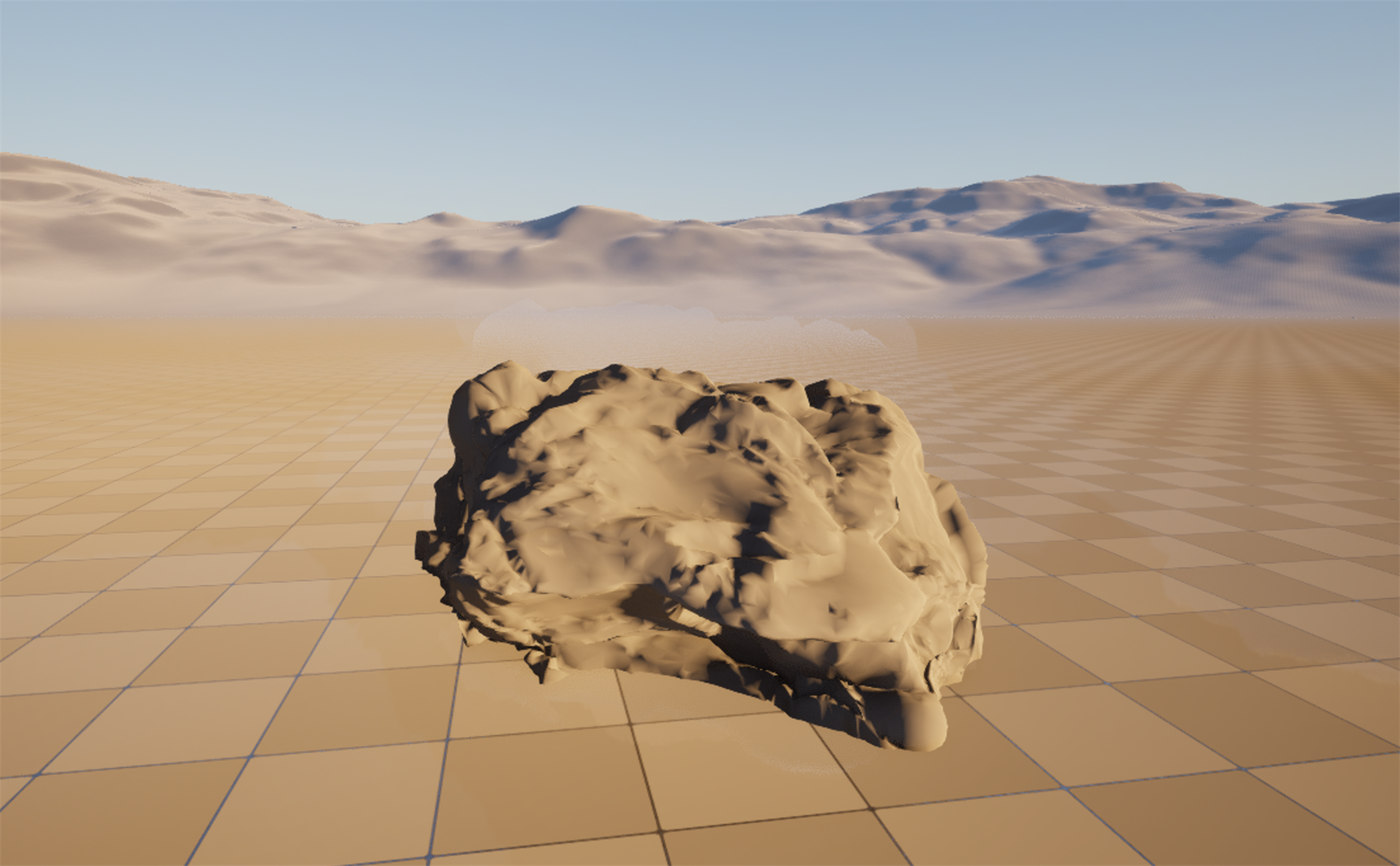
Figure: Lumen's bounce, captured live in the course's Unreal project · a desert rock under a low warm sun. The side facing away from the sun gets no direct light, yet it glows warm rather than going black, because light bounced off the sunlit sand fills it and carries the sand's color. That fill is global illumination, computed in real time with no bake (the project runs Lumen for both global illumination and reflections, verified).
💡 The relight loop: no build step
flowchart LR
    EDIT[Move the sun or a light,
change a material] --> UPDATE[Lumen recomputes the bounce
and reflections in real time]
    UPDATE --> SEE[You see the final lit look
right away, with no build]
    SEE --> AGAIN[Adjust again
the loop is instant]
    AGAIN --> EDIT
    style EDIT fill:#faf0e6,stroke:#c1662f
    style UPDATE fill:#ede7f6,stroke:#7e57c2
    style SEE fill:#e8f5e9,stroke:#4CAF50
    style AGAIN fill:#fdf1e7,stroke:#c1662f
No bake sits between a change and its result, so lighting becomes a live, interactive loop instead of a commit-and-wait cycle. This is what makes a dynamic sun and fast iteration possible.
Software, Hardware, and the Cost
Lumen traces rays against the scene, and there are two ways it can do that tracing, which is the main knob you will meet. Software ray tracing is the default: it traces against the coarse mesh distance fields described earlier, it runs on a wide range of graphics cards, and it needs the project to generate those distance fields. Hardware ray tracing instead uses the dedicated ray tracing units on a capable GPU to trace against the actual triangle geometry, which gives sharper reflections and more accurate contact between surfaces, at the price of requiring that hardware and more performance. Both are Lumen and produce the same kind of result; hardware ray tracing simply buys more accuracy where the GPU can afford it.
None of this is free, and that is the honest boundary of the pillar. Lumen costs more than reading a baked lightmap or skipping the bounce entirely, so it targets mid-range and high-end hardware rather than the lowest tier, and it comes with quality settings, how detailed the scene stand-in is and how many rays the gather uses, that trade cost against fidelity. Very small or very thin emissive details can be missed by the coarse representation, and there are scenes where a carefully baked solution is still cheaper. The trade Lumen offers is clear: you give up some performance and accept some approximation, and in return you get dynamic, bounced light and reflections with no bake and instant iteration. For a modern environment built to be lit and relit, that is usually the trade you want.
Figure: The tracing choice and the cost · software ray tracing traces coarse distance fields and runs broadly; hardware ray tracing traces real triangles for sharper results on a capable GPU. Both are Lumen, and both cost more than a baked lightmap, which is the trade you make for dynamic, bake-free light.
Hands-On: Move the Sun and Watch It Bounce
This lesson is best felt live, because the whole point of Lumen is that you can see it react. The exercise is to set up a simple lit scene and then move the light, so the words in this lesson, the bounce, the fill, the instant loop, turn into something you watch happen in your own viewport.
🔆 Exercise: see the bounce fill a shadow, live
- Confirm Lumen is on. In Project Settings, under Rendering, check that the Dynamic Global Illumination Method and the Reflection Method are both set to Lumen. This is the default in a new project and is how this course's project is set.
- Build a tiny scene. Drop a light-colored floor and one detailed object on it, a rock or any prop, and add a Directional Light for the sun plus a Sky Light. You now have a surface for light to bounce off and an object to catch the bounce.
- Find the shadow side. Angle the sun low from one side so one face of the object is lit and the opposite face falls into shadow. Notice that the shadow side is not black; it holds a soft fill. That fill is Lumen's bounced light.
- Move the sun. Rotate the Directional Light and watch the whole scene relight in real time, with no build step. The bounce, the shadows, and any reflections all follow the sun as you drag it.
- Tint the bounce. Change the floor to a strongly colored material and look at the shadow side of the object again. It now picks up that color, because the light filling it bounced off the colored floor. That is color in global illumination, live.
💡 Hint: how do I see the difference GI makes?
Open the viewport's view mode menu (the one that normally reads Lit) and look for the Lumen and global illumination visualization options, or toggle the reflection and global illumination show flags. Turning the indirect light off drops every shadow to near black; turning it back on fills them again. Flipping that switch is the fastest way to see exactly what the bounce is contributing to your scene.
✅ Reach exercise: relight the same scene twice
Take your little scene and light it as a warm early morning, sun low and golden, then, without any build or bake, swing the sun high and cool for harsh midday. Notice that you did nothing but move and recolor the light, and the entire look, the bounce, the shadow fill, the reflections, changed with it in real time. Under the old baked pipeline each of those would have been a separate bake and a separate wait. That is the relight loop, and it is the reason a modern environment can carry a moving sun and a full day-night cycle.
Knowledge Check
Question 1
What is global illumination?
Correct answer: B · Global illumination is the light that reaches a surface after bouncing off other surfaces. It fills the areas direct light cannot reach and tints them with the color of what it bounced off. Without it, shadow sides go flat black.
Question 2
Why was lighting traditionally baked into lightmaps?
Correct answer: A · Real-time global illumination used to be out of reach, so the bounce was precomputed ahead of time and frozen into lightmap textures. Runtime was then cheap, but every lighting change meant another slow bake, and the lights had to stay still.
Question 3
How does Lumen compute global illumination without baking?
Correct answer: B · Lumen keeps a lightweight representation of the scene, built from mesh distance fields and a cache of surface lighting, and traces rays against that cheap stand-in each frame to gather the bounce. Because nothing is precomputed, there are no lightmaps and the lights can move.
Question 4
How do Lumen reflections relate to its global illumination?
Correct answer: B · A reflection asks what a surface sees in the mirror direction, the same question the bounce answers. Lumen traces the same stand-in scene, so reflections show a world that already has global illumination, and smooth surfaces get a crisp trace while rough ones read a cheaper blurred result.
Question 5
What is a fair statement about the choice between software and hardware ray tracing, and Lumen's cost?
Correct answer: B · Software ray tracing is the default, tracing coarse distance fields across a wide range of GPUs; hardware ray tracing traces the actual triangles for sharper reflections and contact where the hardware allows. Both are Lumen, and both cost more than reading a baked lightmap, which is the trade for dynamic, bake-free light.
Summary
You now know the second pillar in depth. Lumen is the reason a modern environment can be lit and relit in real time, with believable bounced light and reflections and no bake. Here is what to carry forward:
Global illumination is the bounce. Direct light travels straight from a source and leaves everything it cannot reach black. Global illumination is the indirect light that has bounced off other surfaces, filling shadows and carrying color. Without it a scene looks harsh and unreal, no matter how detailed the geometry.
Baking traded workflow for runtime cost. Because real-time bounce was once too expensive, lighting was precomputed into lightmaps. That made runtime cheap but froze the lights in place and turned every lighting change into a slow rebake, with no moving sun.
Lumen computes the bounce live, and reflections come with it. Lumen keeps a coarse stand-in of the scene and traces rays against it every frame to gather indirect light, so there is no bake and the sun can move. Reflections trace the same stand-in, so they show a world with global illumination already in it. The result is an instant relight loop, tuned with software or hardware ray tracing, at a real but usually worthwhile performance cost.
🔑 Key Takeaways
- Global illumination is the bounced, indirect light that fills shadows and carries the color of the surfaces it bounced off; direct light alone leaves those areas black
- Lighting used to be baked into lightmaps because real-time bounce was too costly, which made the lights static and every change a slow rebake
- Lumen computes the bounce every frame by tracing a coarse scene stand-in of distance fields and a surface cache, so there is no bake and the sun can move
- Lumen reflections come from the same system and show a world that already has global illumination, crisp on smooth surfaces and blurred on rough ones
- Software ray tracing runs broadly on distance fields while hardware ray tracing traces real triangles for sharper results; Lumen costs more than a baked lightmap, the trade for dynamic, bake-free light and an instant relight loop
👆 A note on this lesson's figures
The desert rock image is a genuine live capture from the course's ClaudeTest project: a scanned-style boulder on the landscape under a low warm sun, with no character in the scene, and it is lit by Lumen with nothing baked. The point it makes is real and visible: the side of the rock facing away from the sun receives no direct light, yet it glows warm rather than going black, because light bounced off the sunlit sand fills it. That warm fill is Lumen's global illumination, computed in real time; the project runs Lumen for both global illumination and reflections, which was confirmed directly. The direct-versus-bounce diagram, the bake loop, the runtime gather, the reflections flow, and the software-versus-hardware map are labeled illustrations, because the internal traces and caches are best understood as diagrams before you watch them react in your own viewport. What they show is what you will confirm live when you move the sun and see the world relight.
Where this fits
This lesson builds out the light pillar the overview introduced, sitting alongside the geometry pillar from Nanite. Next in the track, PCG takes procedural placement, before a capstone assembles a full environment. Lumen is what lets the worlds built here be lit for the Cinematic Production track, whose cinematic lighting lesson shapes a shot inside a Lumen-lit scene, and it deepens the beginner introduction in Lumen global illumination. In the larger Story-to-Screen pipeline, this is the craft behind the light of shot assembly.